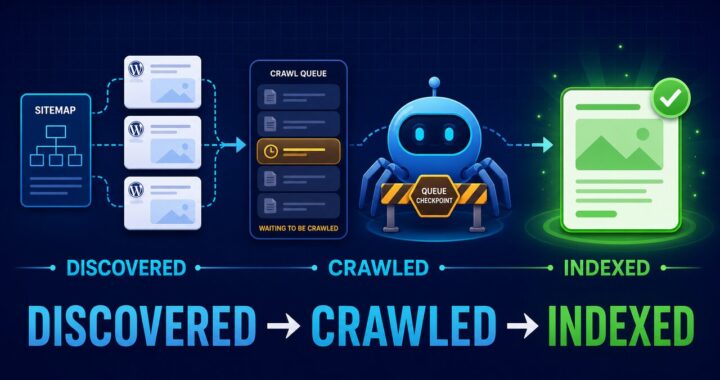

Quick answer: “Crawled – currently not indexed” means Google visited the URL but has not added it to the searchable index. It is not a WordPress error code and requesting indexing repeatedly is rarely the solution. First verify that the page is indexable and canonical, then improve or consolidate the page if it does not provide a distinct answer.
If Google knows the URL but has not crawled it yet, use the separate Discovered – currently not indexed WordPress guide. That status requires discovery, crawl-access, internal-link, sitemap, and server checks before content-quality diagnosis.
What the status does—and does not—mean
The message appears under Search Console → Indexing → Pages. It confirms that Google fetched the page. It does not prove a penalty, a crawl-budget problem, or a broken sitemap. A new page may be indexed later without changes, but a weak or duplicate page may remain excluded.
1. Inspect the exact URL
Open URL Inspection and paste one affected URL. Record the last crawl date, crawl result, Google-selected canonical, user-declared canonical, referring sitemap, and whether indexing is allowed. Test the live URL as well. Work from this evidence instead of applying the same fix to every excluded page.
2. Confirm WordPress allows indexing
Go to Settings → Reading. “Discourage search engines from indexing this site” should be unchecked on a public site. Then inspect the individual post’s Yoast advanced settings and confirm that search engines are allowed to show it.
View the page source and search for noindex. If the page contains a noindex robots directive, remove it only when the page genuinely belongs in search results.
3. Compare the canonical URLs
The page should normally declare itself as canonical. In URL Inspection, compare the user-declared canonical with Google’s selected canonical. If Google selects another page, determine whether the two URLs answer the same question. Consolidate overlapping content instead of forcing two near-duplicates into the index.
4. Remove thin demo and archive URLs
WordPress themes can create sample pages, portfolio layouts, author archives, tag archives, attachment pages, and empty categories. These URLs compete for crawl attention and often add no independent value. Delete unused demos, redirect accidental duplicates where appropriate, and noindex archives that users do not need from search.
5. Test whether the page has a unique job
Write the exact search problem the page solves in one sentence. If another page on your site already solves it, merge them. If the article contains general advice that could fit many unrelated topics, rewrite it around the specific error, product, symptom, or workflow.
- Give the answer near the top.
- Include exact menu paths, settings, commands, or measurements.
- Add original screenshots or test results.
- Explain how to verify that the fix worked.
- Remove repeated paragraphs and filler.
6. Strengthen internal discovery
Link to the affected article from a relevant indexed page using descriptive anchor text. Make sure the post is reachable through normal HTML links and belongs to a useful category. Avoid creating dozens of unrelated links merely to attract a crawl.
7. Keep only canonical pages in the sitemap
The XML sitemap should list URLs you want indexed. Remove noindexed, redirected, deleted, duplicate, and demo URLs. Submitting a sitemap helps discovery but does not guarantee indexing.
8. Check server and rendering quality
The live URL should return HTTP 200 quickly and show the complete main content without requiring interaction. Fix intermittent 5xx responses, login challenges, blank templates, intrusive overlays, or important text that fails to render. Use the live test and rendered screenshot in URL Inspection when available.
9. Request indexing once after a meaningful change
After correcting technical problems or substantially improving the article, use Request indexing once. Do not resubmit the same unchanged URL every day. Google states that requesting a recrawl does not guarantee immediate inclusion.
Decision guide
| Finding | Action |
|---|---|
| Noindex present by mistake | Remove it, test live URL, request indexing |
| Wrong canonical | Correct canonical or consolidate duplicates |
| Theme/demo URL | Delete, 410/404, or redirect when a true replacement exists |
| Overlapping article | Merge into the stronger page |
| Useful new page with no technical issue | Add contextual internal links and wait |
| Generic or repetitive content | Rewrite with tested, problem-specific instructions |
How to verify progress
Use URL Inspection for the individual page and the Page indexing report for the overall trend. The report can update later than the live URL. A successful outcome is “URL is on Google” with the intended canonical. Ranking still depends on relevance, usefulness, competition, and other signals.
Related fix: If Search Console cannot retrieve your XML file, follow the Yoast sitemap Couldn’t fetch troubleshooting guide.
Sources
- Google Search Console: Page indexing report
- Google: Ask Google to recrawl URLs
- Google: Creating helpful, reliable, people-first content
- Google: Canonicalization and duplicate URLs
Last reviewed: July 2026.